
Plot Method for DPprior_fit Objects
plot.DPprior_fit.RdCreates visualizations of a prior elicitation result. Multiple plot types are available, including individual distribution plots and comprehensive dashboards.
Arguments
- x
A
DPprior_fitobject.- type
Character; the type of plot to create:
- "auto"
(Default) Automatically selects the appropriate plot type. Uses
"dual"for current hard and soft dual fits. A1, A2, and retained legacy fits use the descriptive single-fit dashboard.- "dashboard"
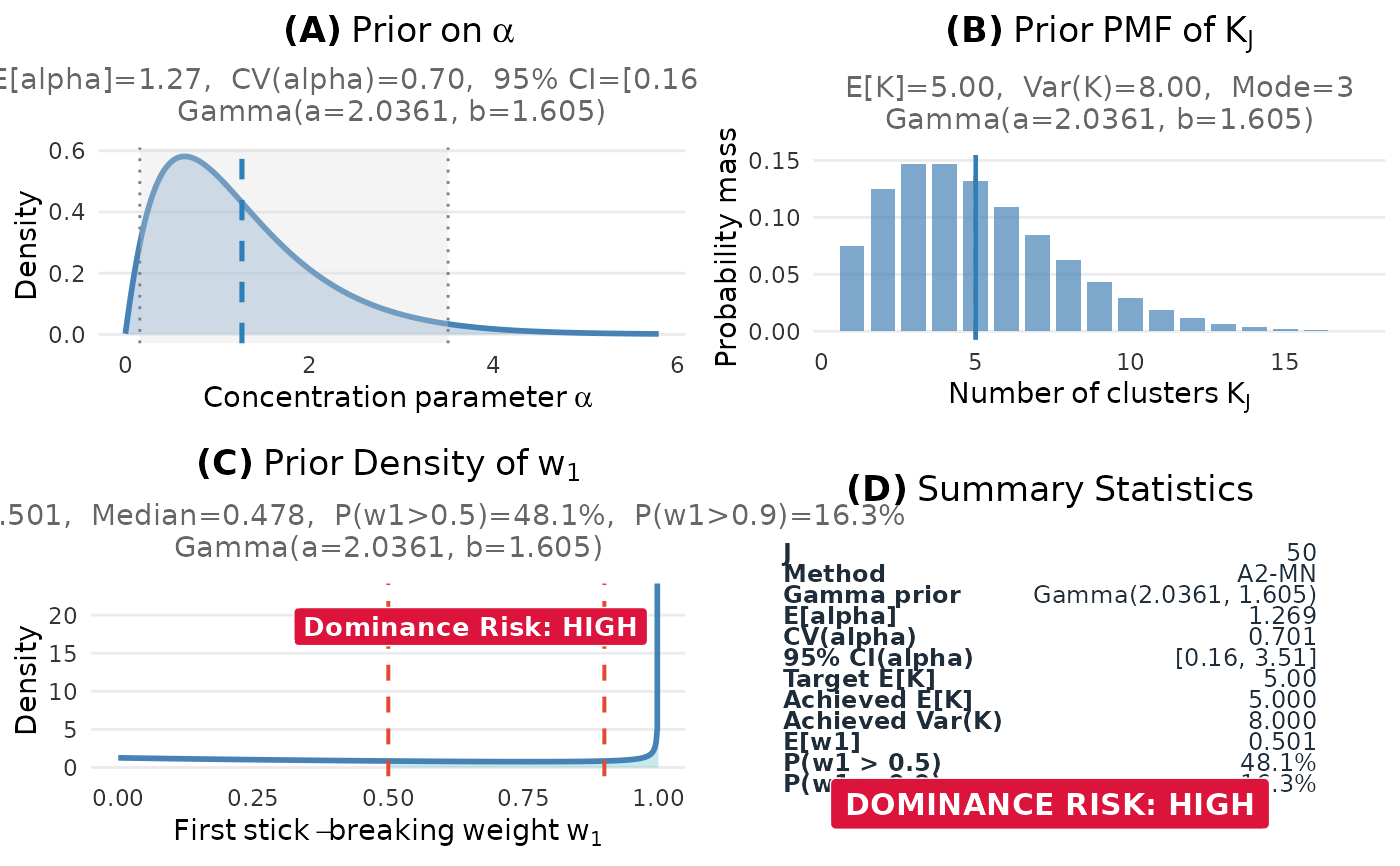
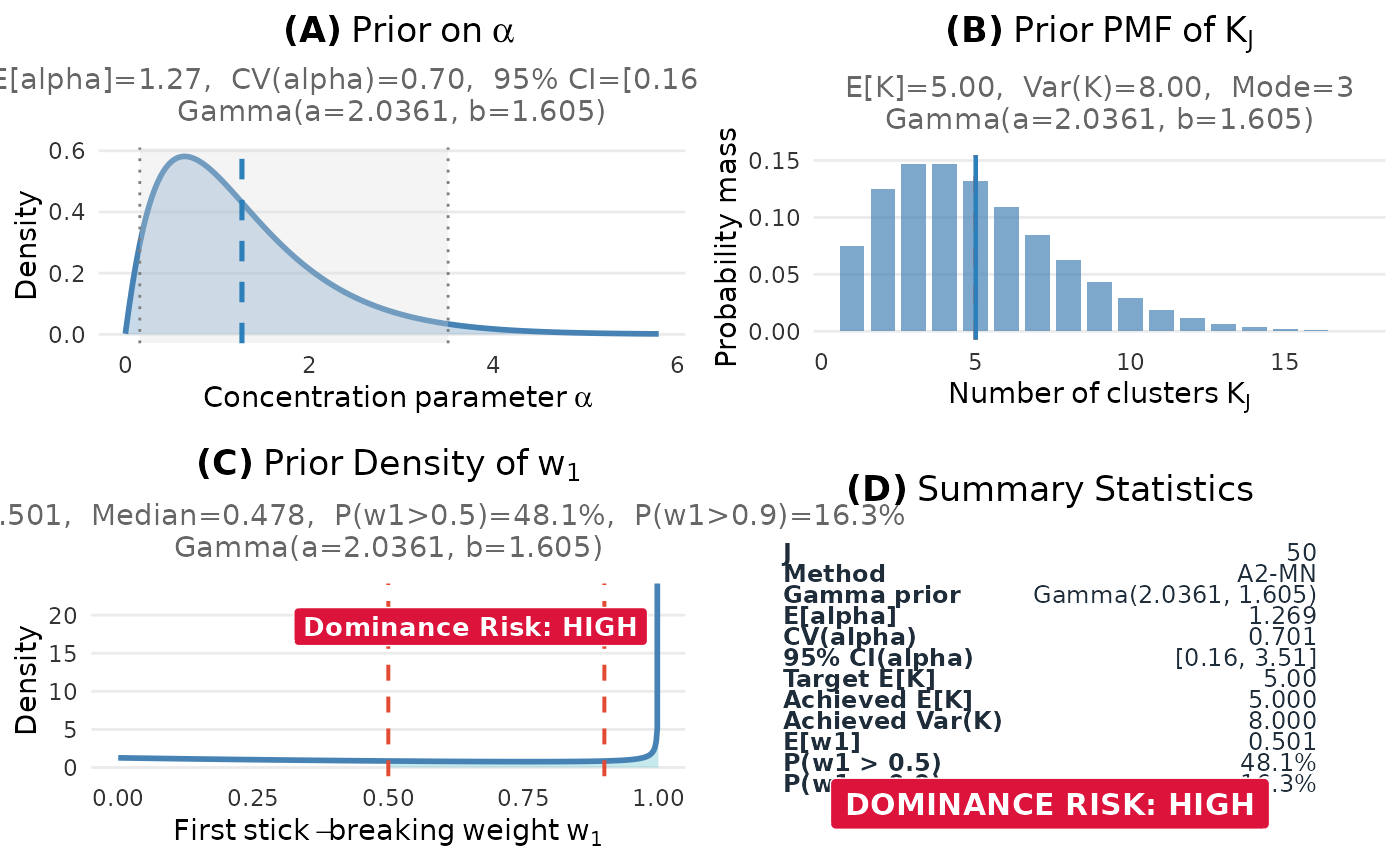
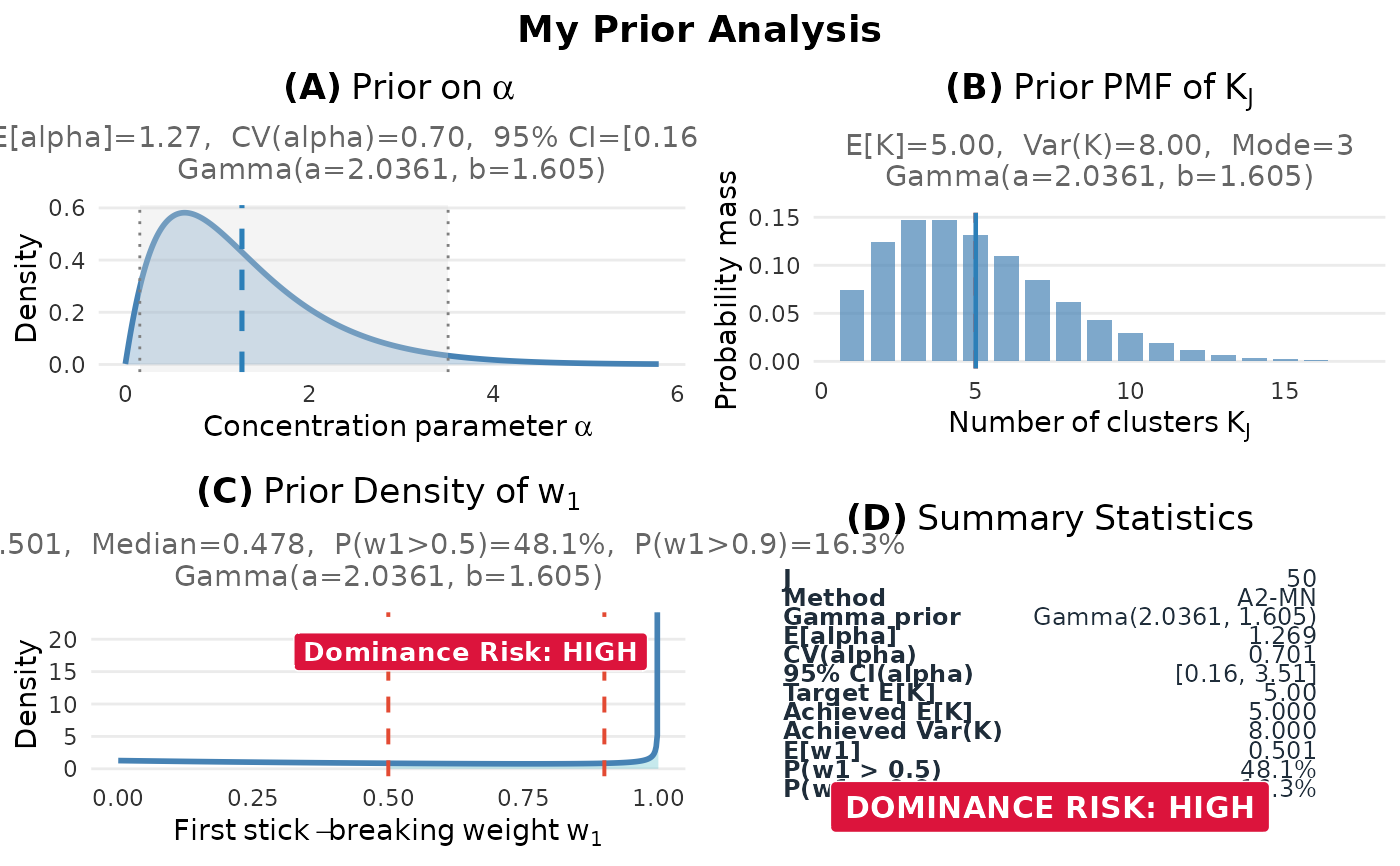
4-panel dashboard showing alpha, K, the first size-biased weight \(W_{SB}\), and summary.
- "alpha"
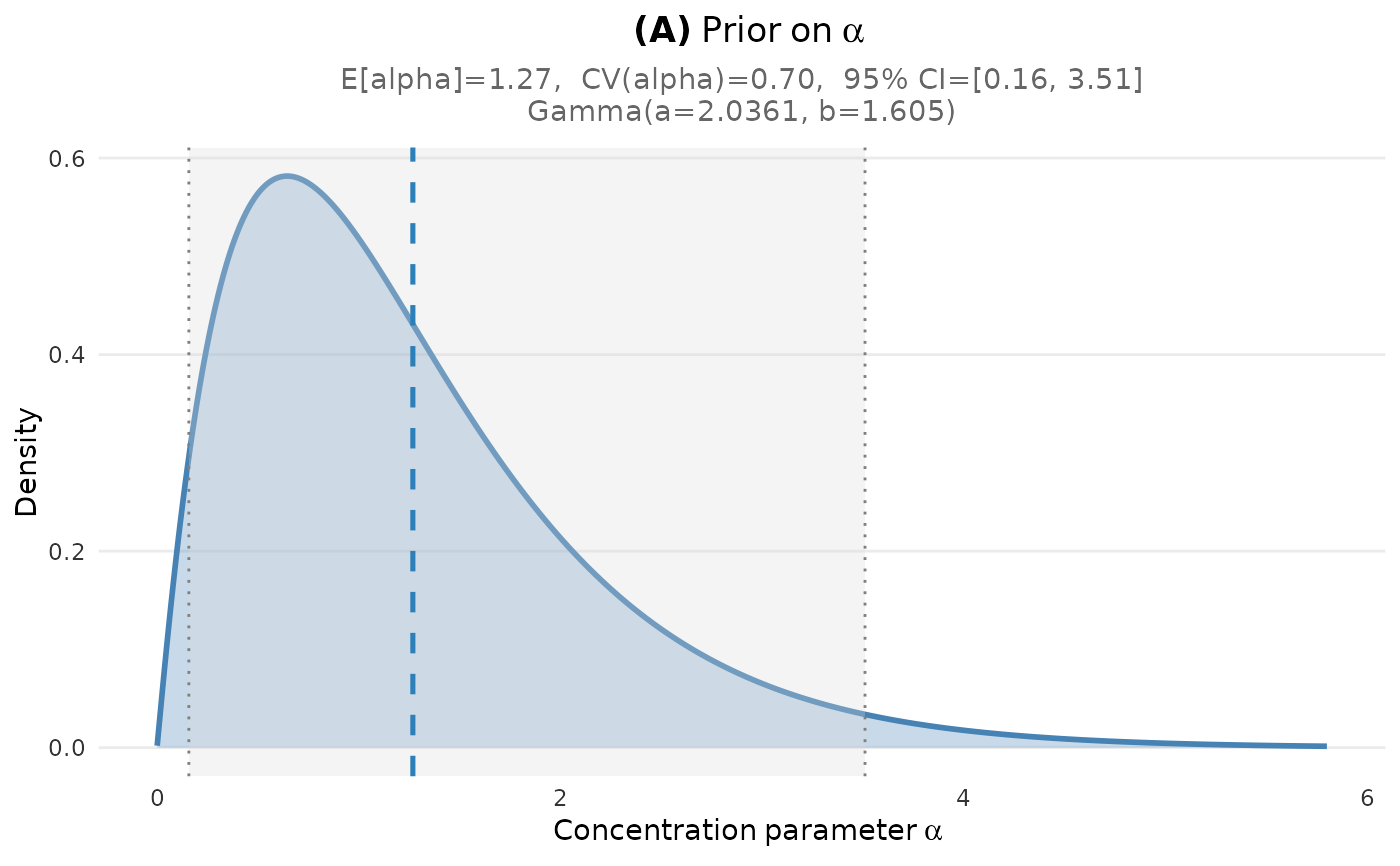
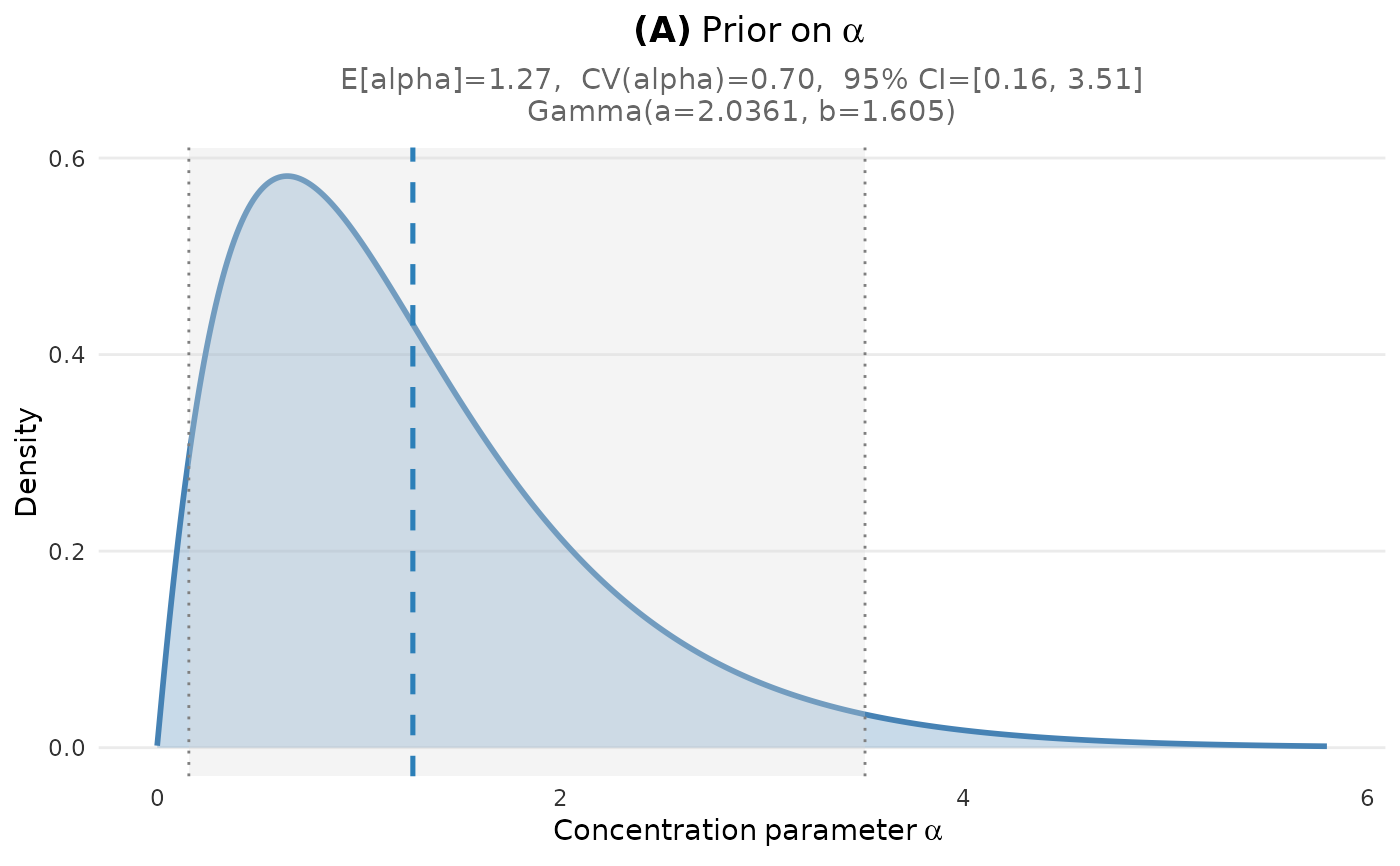
Prior density of the concentration parameter alpha.
- "K"
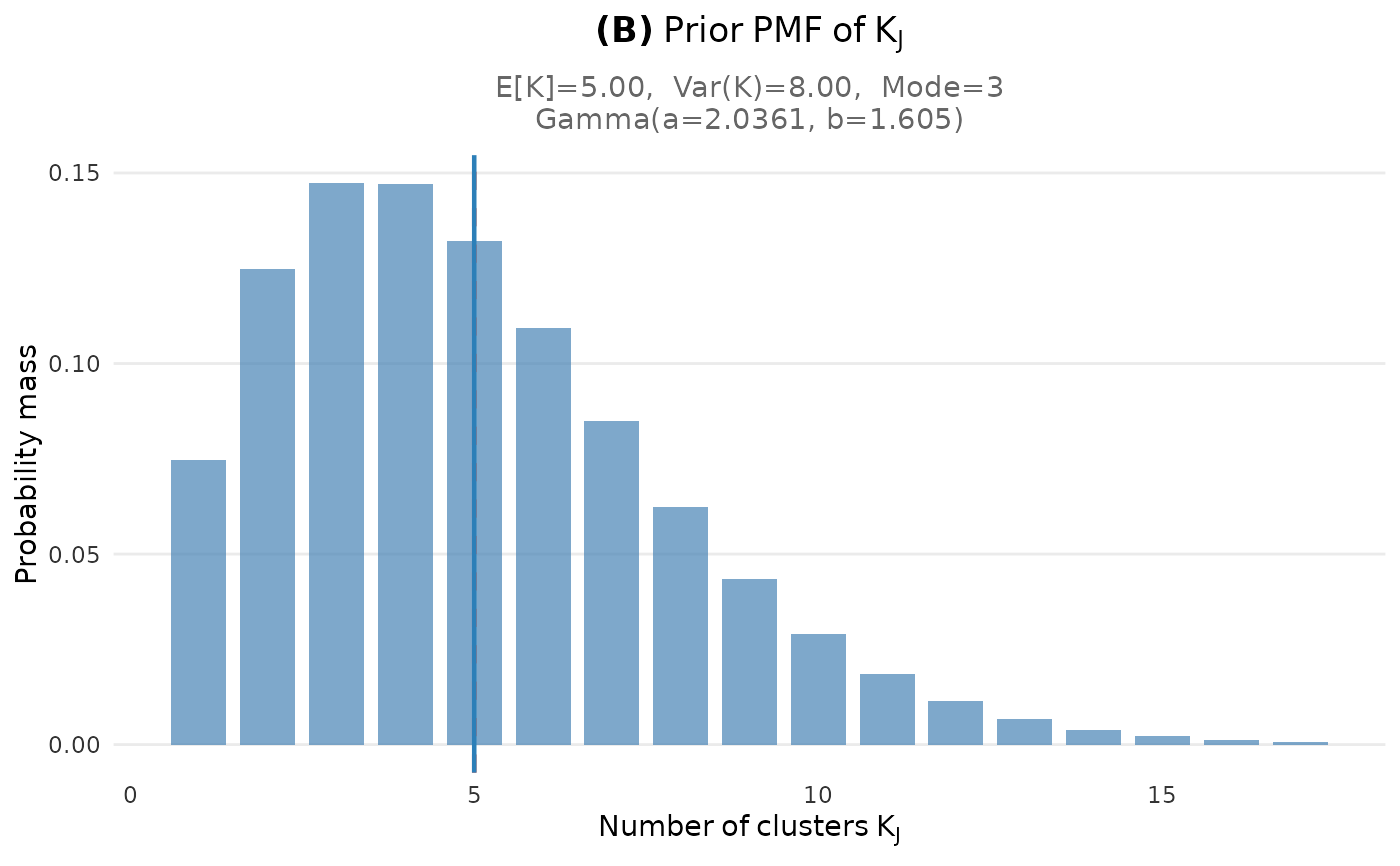
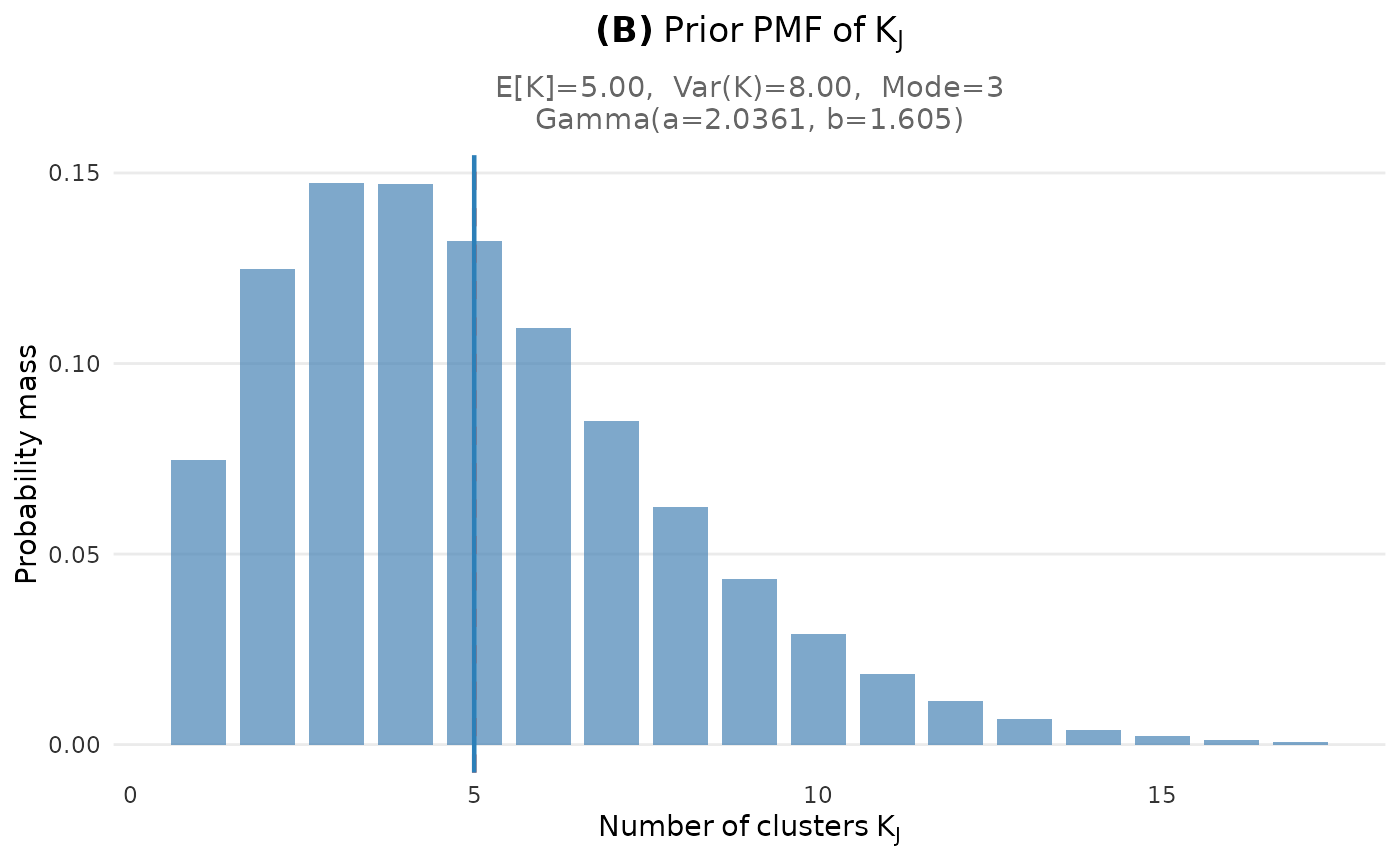
Prior PMF of the number of clusters \(K_J\).
- "w1"
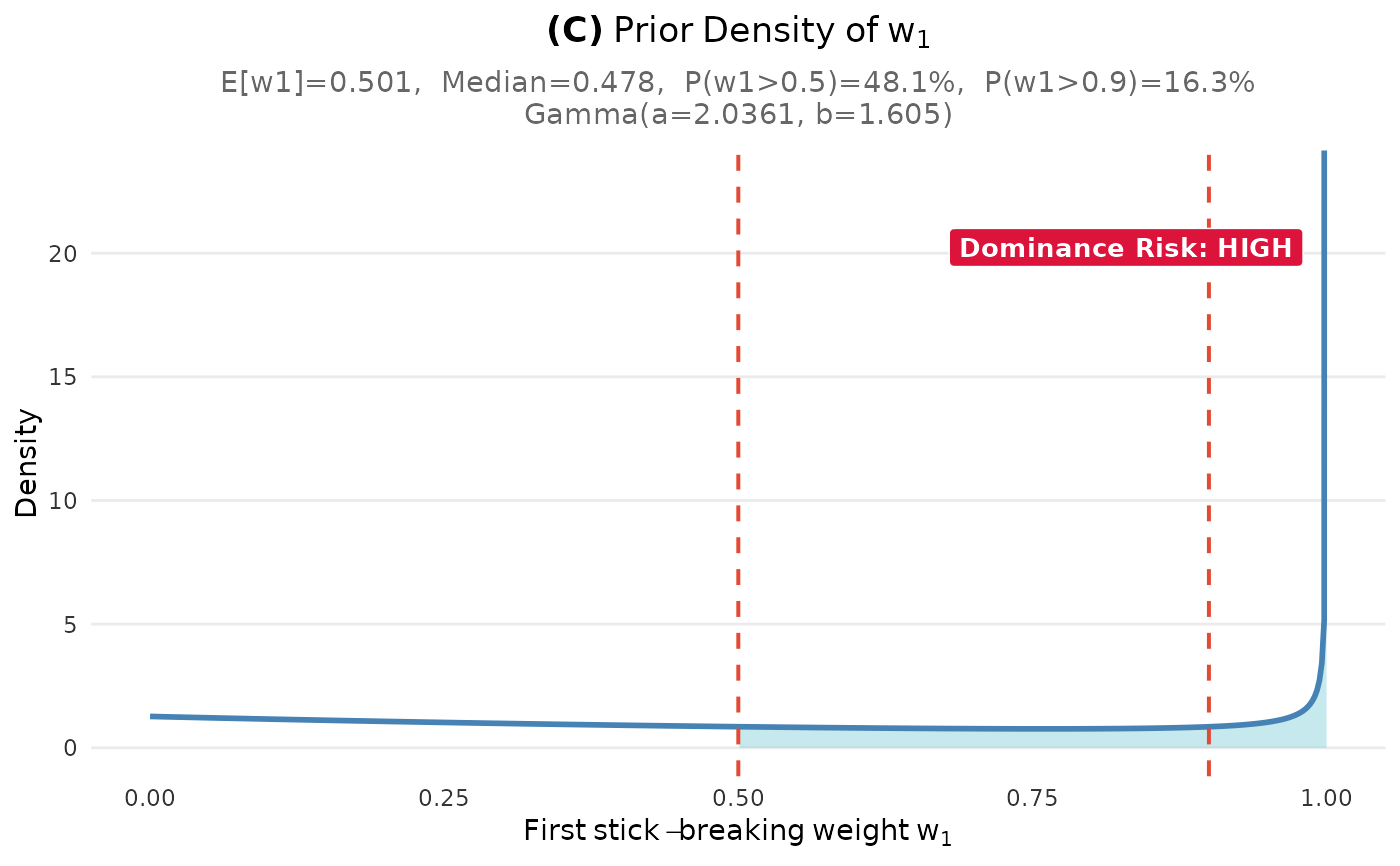
Prior density of the first size-biased DP weight \(W_{SB}\).
- "dual"
Authoritative K-only comparison for current hard or soft dual fits. Legacy fits raise a typed lineage-unavailable condition.
- "comparison"
Same as "dual".
- engine
Character; graphics engine to use:
"ggplot2"(default) or"base".- ...
Additional arguments passed to the underlying plot functions. Common options include:
- base_size
Base font size (default: 11)
- ci_level
Credible interval level for alpha plot (default: 0.95)
- title
Optional title for the dashboard
- show
If TRUE, display the plot; if FALSE, return silently
Value
Depends on the plot type and engine:
For ggplot2: Returns a ggplot object or gtable (for dashboards)
For base: Returns invisible(NULL)
Details
The "auto" type is recommended for most use cases. It automatically
uses an authoritative comparison only for current hard or soft calibration.
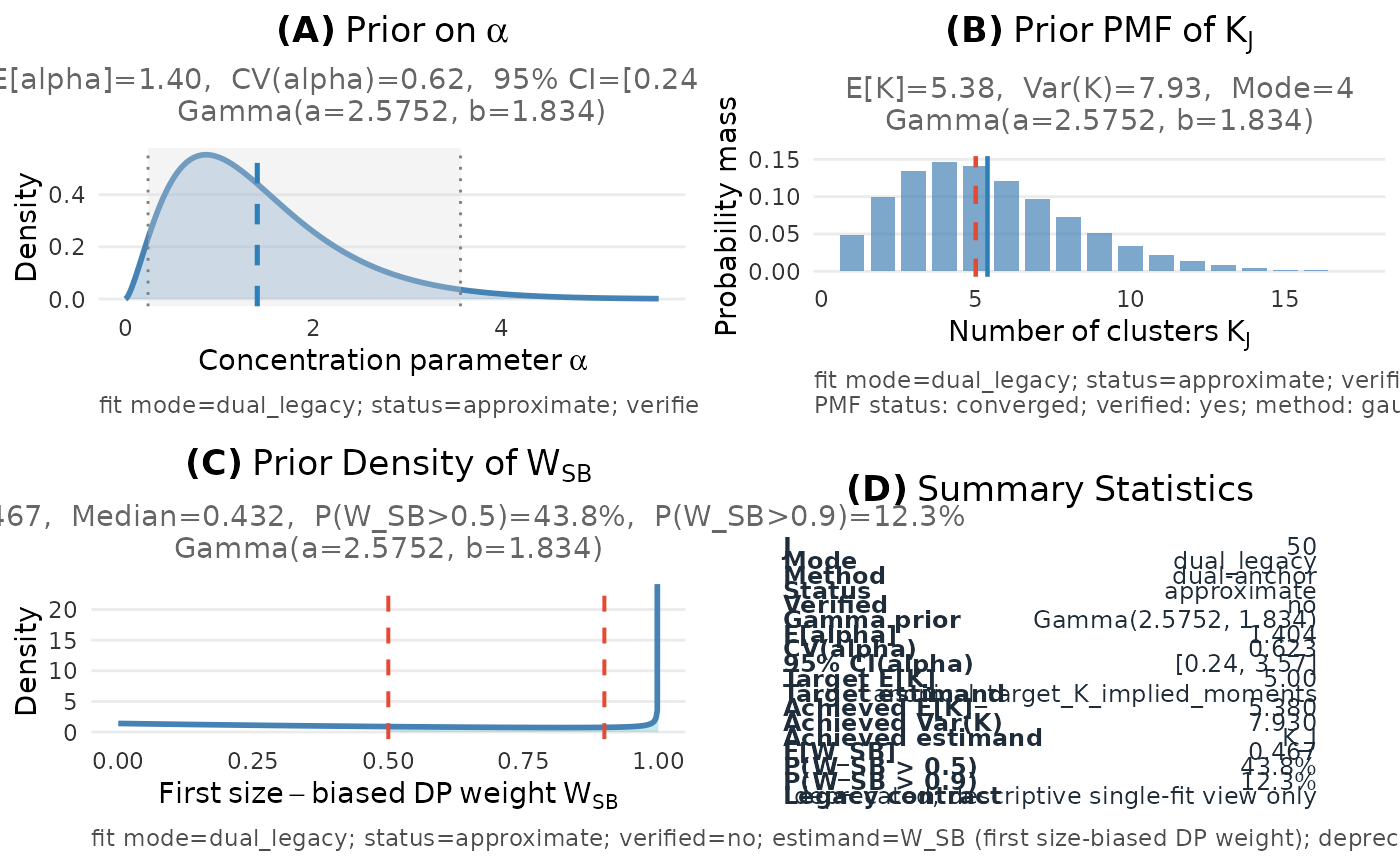
Retained legacy results remain available as status-labelled descriptive
single-fit plots; no compatibility initialization is used as comparison
science.
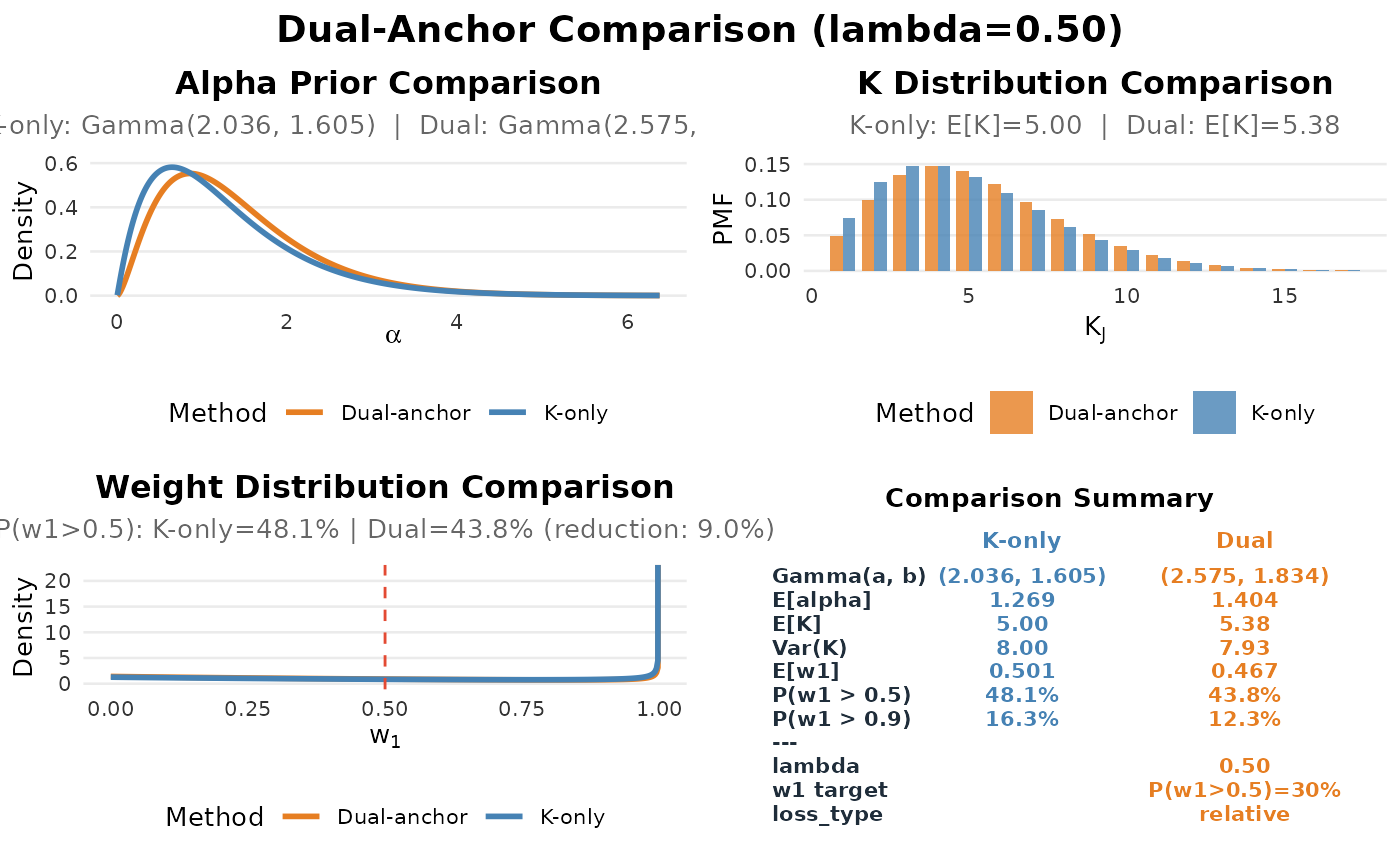
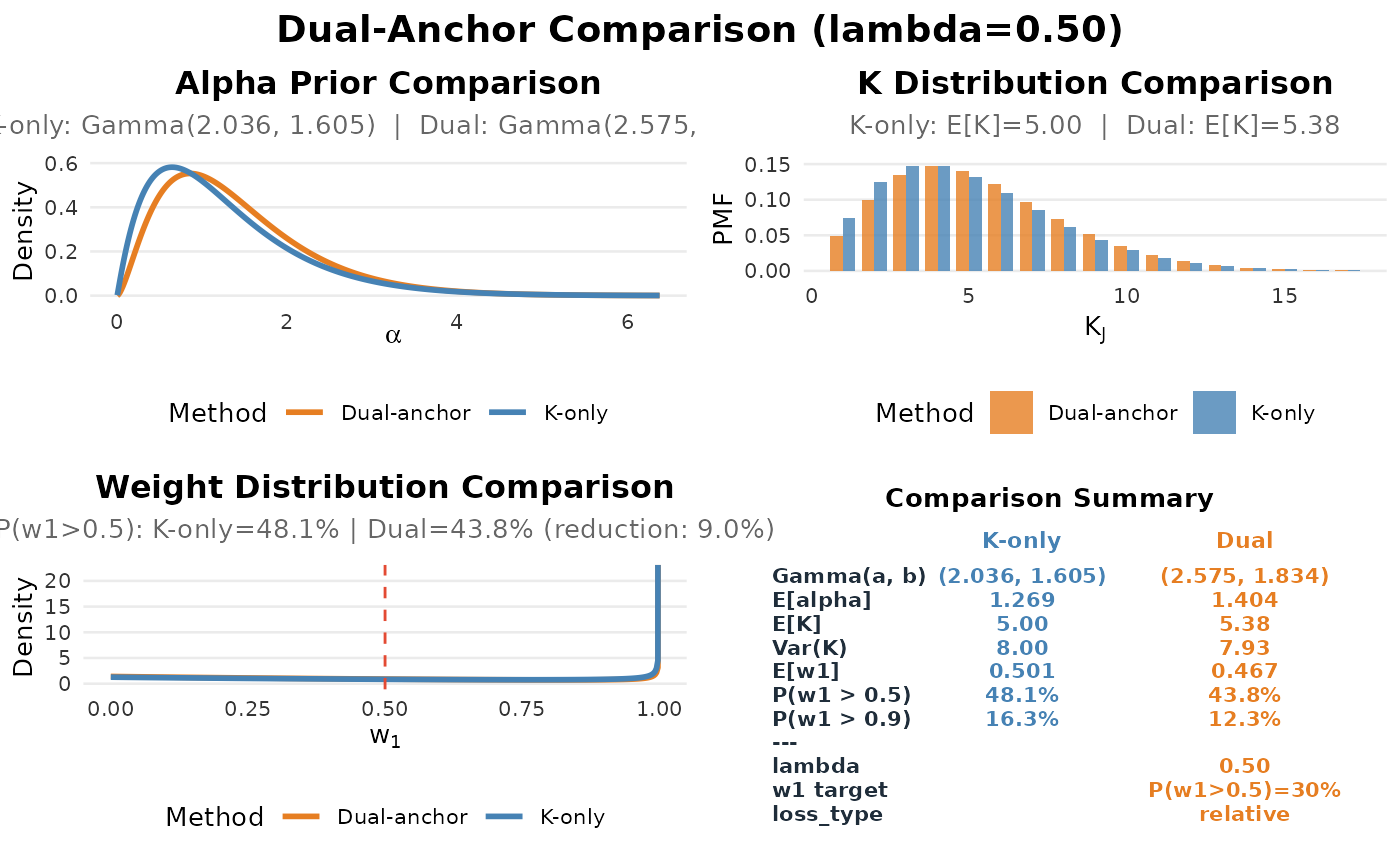
For dual-anchor fits, the comparison dashboard shows:
Alpha prior: K-only vs Dual-anchor
K distribution comparison
\(W_{SB}\) distribution comparison with named tail thresholds
Summary comparison table
Plot Type Details
- dashboard
A 2x2 grid showing: (A) Alpha prior density with CI (B) \(K_J\) prior PMF with mode and mean (C) first size-biased weight density with threshold shading (D) Summary statistics table
- alpha
Gamma(a, b) density with: - Mean line (dashed) - Credible interval (shaded region) - Annotation with moments and CI
- K
Bar plot of \(P(K_J = k)\) with: - Target mean line - Achieved mean line - Optional CDF overlay
- w1
Density plot with: - Explicit threshold-region shading for \(W_{SB}\) - Threshold lines - Estimand-labelled exceedance probabilities
Examples
# Create a fit object
fit <- DPprior_fit(J = 50, mu_K = 5, var_K = 8)
# Auto-detect best plot type
plot(fit)
 #> TableGrob (2 x 2) "dpprior_dashboard": 4 grobs
#> z cells name grob
#> 1 1 (1-1,1-1) dpprior_dashboard gtable[layout]
#> 2 2 (2-2,1-1) dpprior_dashboard gtable[layout]
#> 3 3 (1-1,2-2) dpprior_dashboard gtable[layout]
#> 4 4 (2-2,2-2) dpprior_dashboard gtable[layout]
# Specific plot types
plot(fit, type = "alpha")
#> TableGrob (2 x 2) "dpprior_dashboard": 4 grobs
#> z cells name grob
#> 1 1 (1-1,1-1) dpprior_dashboard gtable[layout]
#> 2 2 (2-2,1-1) dpprior_dashboard gtable[layout]
#> 3 3 (1-1,2-2) dpprior_dashboard gtable[layout]
#> 4 4 (2-2,2-2) dpprior_dashboard gtable[layout]
# Specific plot types
plot(fit, type = "alpha")
 plot(fit, type = "K")
 plot(fit, type = "w1")
 plot(fit, type = "dashboard")
 #> TableGrob (2 x 2) "dpprior_dashboard": 4 grobs
#> z cells name grob
#> 1 1 (1-1,1-1) dpprior_dashboard gtable[layout]
#> 2 2 (2-2,1-1) dpprior_dashboard gtable[layout]
#> 3 3 (1-1,2-2) dpprior_dashboard gtable[layout]
#> 4 4 (2-2,2-2) dpprior_dashboard gtable[layout]
# With custom options
plot(fit, type = "dashboard", title = "My Prior Analysis")
#> TableGrob (2 x 2) "dpprior_dashboard": 4 grobs
#> z cells name grob
#> 1 1 (1-1,1-1) dpprior_dashboard gtable[layout]
#> 2 2 (2-2,1-1) dpprior_dashboard gtable[layout]
#> 3 3 (1-1,2-2) dpprior_dashboard gtable[layout]
#> 4 4 (2-2,2-2) dpprior_dashboard gtable[layout]
# With custom options
plot(fit, type = "dashboard", title = "My Prior Analysis")
 #> TableGrob (3 x 2) "dpprior_dashboard": 5 grobs
#> z cells name grob
#> 1 1 (2-2,1-1) dpprior_dashboard gtable[layout]
#> 2 2 (3-3,1-1) dpprior_dashboard gtable[layout]
#> 3 3 (2-2,2-2) dpprior_dashboard gtable[layout]
#> 4 4 (3-3,2-2) dpprior_dashboard gtable[layout]
#> 5 5 (1-1,1-2) dpprior_dashboard text[GRID.text.698]
# Current soft dual comparison
fit_K <- DPprior_a2_newton(J = 50, mu_K = 5, var_K = 8)
fit_dual <- DPprior_dual_soft(
fit_K,
target = list(
metric = "wsb_tail", relation = "target",
threshold = 0.5, value = 0.3
),
lambda = 0.5
)
plot(fit_dual) # Auto-selects dual comparison
#> TableGrob (3 x 2) "dpprior_dashboard": 5 grobs
#> z cells name grob
#> 1 1 (2-2,1-1) dpprior_dashboard gtable[layout]
#> 2 2 (3-3,1-1) dpprior_dashboard gtable[layout]
#> 3 3 (2-2,2-2) dpprior_dashboard gtable[layout]
#> 4 4 (3-3,2-2) dpprior_dashboard gtable[layout]
#> 5 5 (1-1,1-2) dpprior_dashboard text[GRID.text.698]
# Current soft dual comparison
fit_K <- DPprior_a2_newton(J = 50, mu_K = 5, var_K = 8)
fit_dual <- DPprior_dual_soft(
fit_K,
target = list(
metric = "wsb_tail", relation = "target",
threshold = 0.5, value = 0.3
),
lambda = 0.5
)
plot(fit_dual) # Auto-selects dual comparison
 #> TableGrob (3 x 2) "dpprior_dashboard": 5 grobs
#> z cells name grob
#> 1 1 (2-2,1-1) dpprior_dashboard gtable[layout]
#> 2 2 (3-3,1-1) dpprior_dashboard gtable[layout]
#> 3 3 (2-2,2-2) dpprior_dashboard gtable[layout]
#> 4 4 (3-3,2-2) dpprior_dashboard gtable[layout]
#> 5 5 (1-1,1-2) dpprior_dashboard text[GRID.text.878]
plot(fit_dual, type = "comparison") # Explicit
#> TableGrob (3 x 2) "dpprior_dashboard": 5 grobs
#> z cells name grob
#> 1 1 (2-2,1-1) dpprior_dashboard gtable[layout]
#> 2 2 (3-3,1-1) dpprior_dashboard gtable[layout]
#> 3 3 (2-2,2-2) dpprior_dashboard gtable[layout]
#> 4 4 (3-3,2-2) dpprior_dashboard gtable[layout]
#> 5 5 (1-1,1-2) dpprior_dashboard text[GRID.text.878]
plot(fit_dual, type = "comparison") # Explicit
 #> TableGrob (3 x 2) "dpprior_dashboard": 5 grobs
#> z cells name grob
#> 1 1 (2-2,1-1) dpprior_dashboard gtable[layout]
#> 2 2 (3-3,1-1) dpprior_dashboard gtable[layout]
#> 3 3 (2-2,2-2) dpprior_dashboard gtable[layout]
#> 4 4 (3-3,2-2) dpprior_dashboard gtable[layout]
#> 5 5 (1-1,1-2) dpprior_dashboard text[GRID.text.1055]
# Retained legacy results use a descriptive single-fit dashboard.
fit_legacy <- suppressWarnings(DPprior_dual(
fit_K, list(prob = list(threshold = 0.5, value = 0.3))
))
plot(fit_legacy)
#> TableGrob (3 x 2) "dpprior_dashboard": 5 grobs
#> z cells name grob
#> 1 1 (2-2,1-1) dpprior_dashboard gtable[layout]
#> 2 2 (3-3,1-1) dpprior_dashboard gtable[layout]
#> 3 3 (2-2,2-2) dpprior_dashboard gtable[layout]
#> 4 4 (3-3,2-2) dpprior_dashboard gtable[layout]
#> 5 5 (1-1,1-2) dpprior_dashboard text[GRID.text.1055]
# Retained legacy results use a descriptive single-fit dashboard.
fit_legacy <- suppressWarnings(DPprior_dual(
fit_K, list(prob = list(threshold = 0.5, value = 0.3))
))
plot(fit_legacy)
 #> TableGrob (2 x 2) "dpprior_dashboard": 4 grobs
#> z cells name grob
#> 1 1 (1-1,1-1) dpprior_dashboard gtable[layout]
#> 2 2 (2-2,1-1) dpprior_dashboard gtable[layout]
#> 3 3 (1-1,2-2) dpprior_dashboard gtable[layout]
#> 4 4 (2-2,2-2) dpprior_dashboard gtable[layout]
try(plot(fit_legacy, type = "comparison")) # typed lineage unavailable
#> Error : The canonical dual fit has no authoritative provenance.input_fit lineage for dual comparison visualization ; no compatibility initialization or explicit substitute was used.
#> TableGrob (2 x 2) "dpprior_dashboard": 4 grobs
#> z cells name grob
#> 1 1 (1-1,1-1) dpprior_dashboard gtable[layout]
#> 2 2 (2-2,1-1) dpprior_dashboard gtable[layout]
#> 3 3 (1-1,2-2) dpprior_dashboard gtable[layout]
#> 4 4 (2-2,2-2) dpprior_dashboard gtable[layout]
try(plot(fit_legacy, type = "comparison")) # typed lineage unavailable
#> Error : The canonical dual fit has no authoritative provenance.input_fit lineage for dual comparison visualization ; no compatibility initialization or explicit substitute was used.